
Patient Portal Software

OmniMD patient portal software gives patients 24/7 access to their health records, appointment scheduling, secure messaging, and billing in one HIPAA-compliant platform that connects directly to your EHR.

Patient Journeys Reimagined, From First Touch to Last

Real-Time Access to Medical Information

Eliminates information latency. Engages patients with their complete medical profiles, labs, e-prescribing, and historical data, through a continuously synchronized interface that reflects clinical updates as they occur. Real-time access to medical information fosters transparency and accountability, transforming passive record-keeping into an active instrument of trust and informed participation.
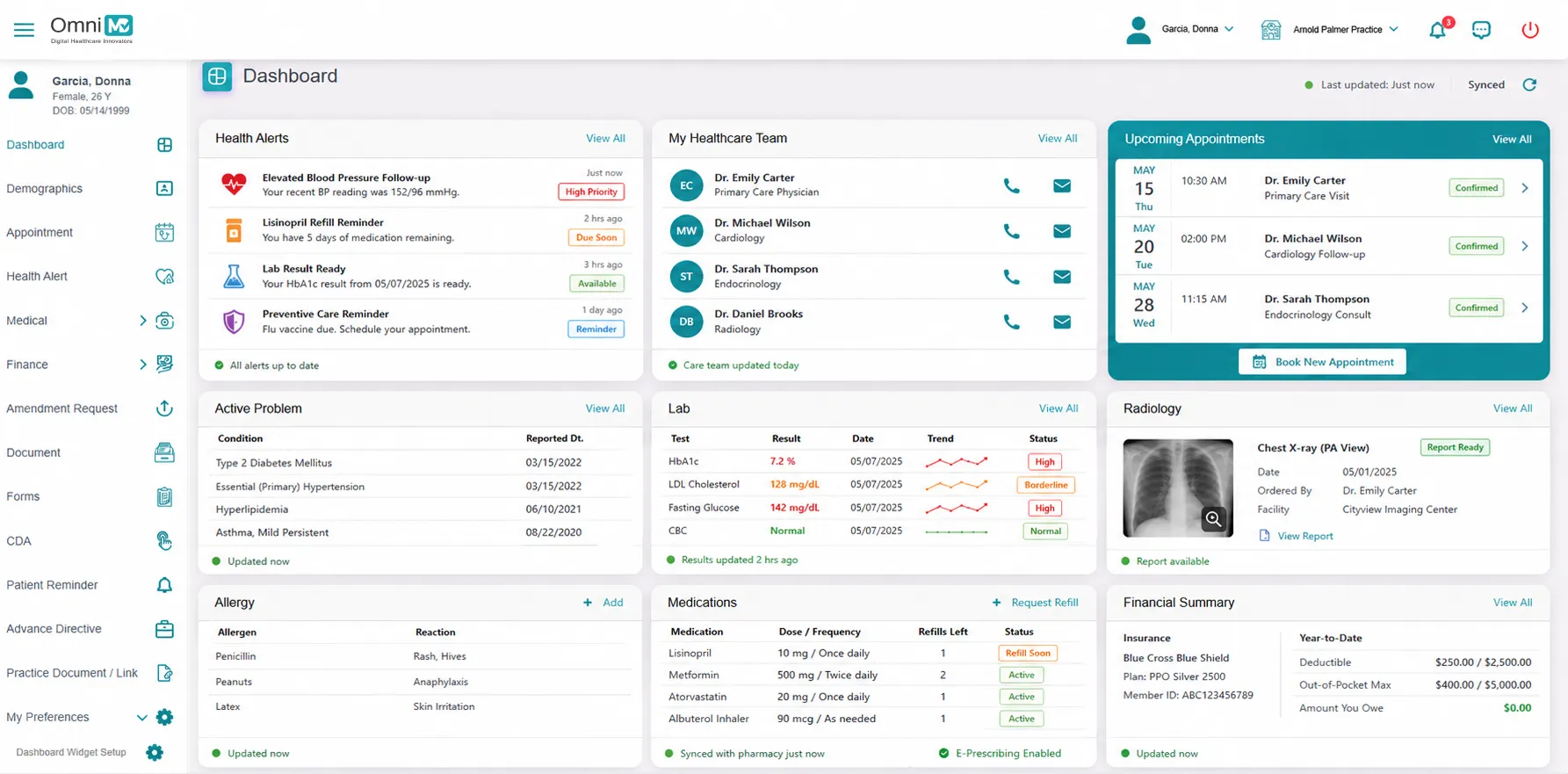
Real-Time Access to Medical Information

Easy Appointment Scheduling

Reengineer Appointment Scheduling as a zero-fiction transaction. Patients can select, modify, or cancel appointments through a smart availability model that adapts to provider load and urgency tiers. Automated reminders are timed automatically to reduce no-shows and optimize calendar utilization without human dependency.
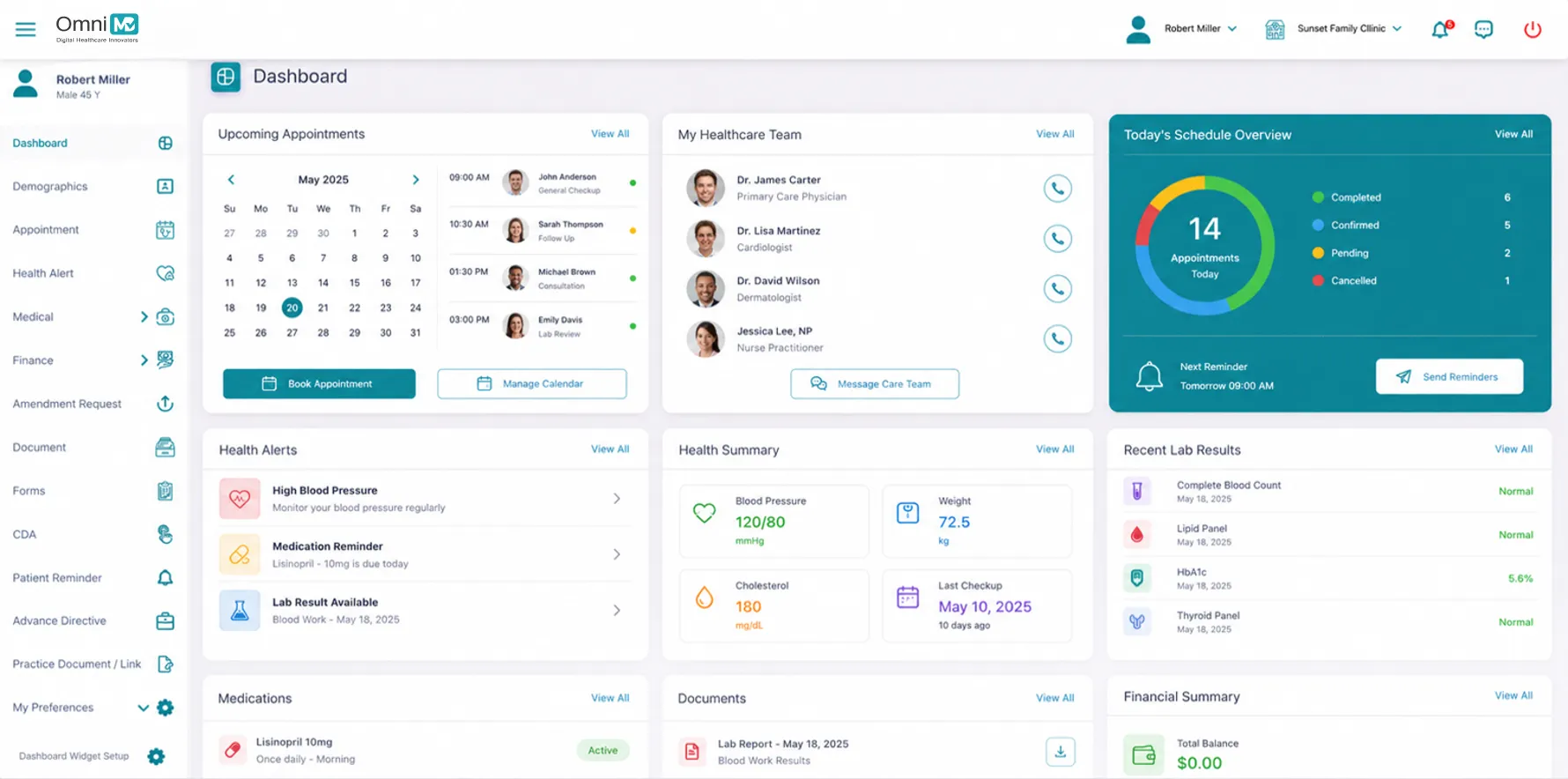
Easy Appointment Scheduling

Secure Messaging

In a structured care dialogue system embedded with hospital-grade HIPAA compliance, patients and clinicians exchange updates and messages within encrypted, HIPAA-compliant channels that ensure continuity, documentation, and accountability. Elevates virtual care from convenience to standard practice. Patients schedule, join, and complete secure video consultations directly through the portal. Our Telehealth stack is directly integrated, compliant, scalable, and context-aware, ensuring clinical quality is never diluted by distance.
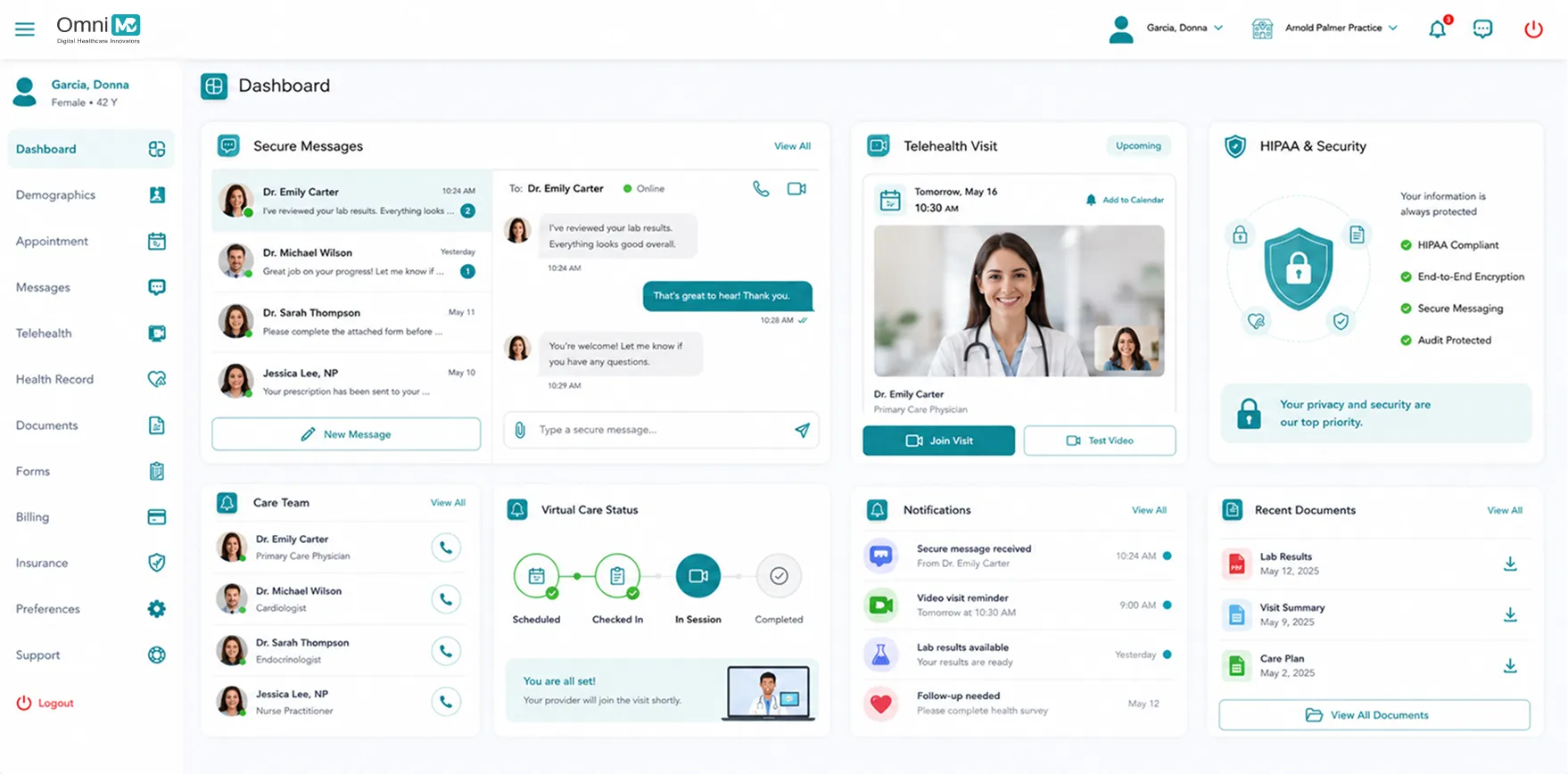
Secure Messaging

Online Billing and Payment

Financial transparency is built into every interaction. Patients receive structured bills, insurance breakdowns, and real-time payment options through a centralized interface. Beyond transaction capability, our system clarifies cost structures, reduces inbound billing queries, and enhances revenue capture with clarity-first financial UX.
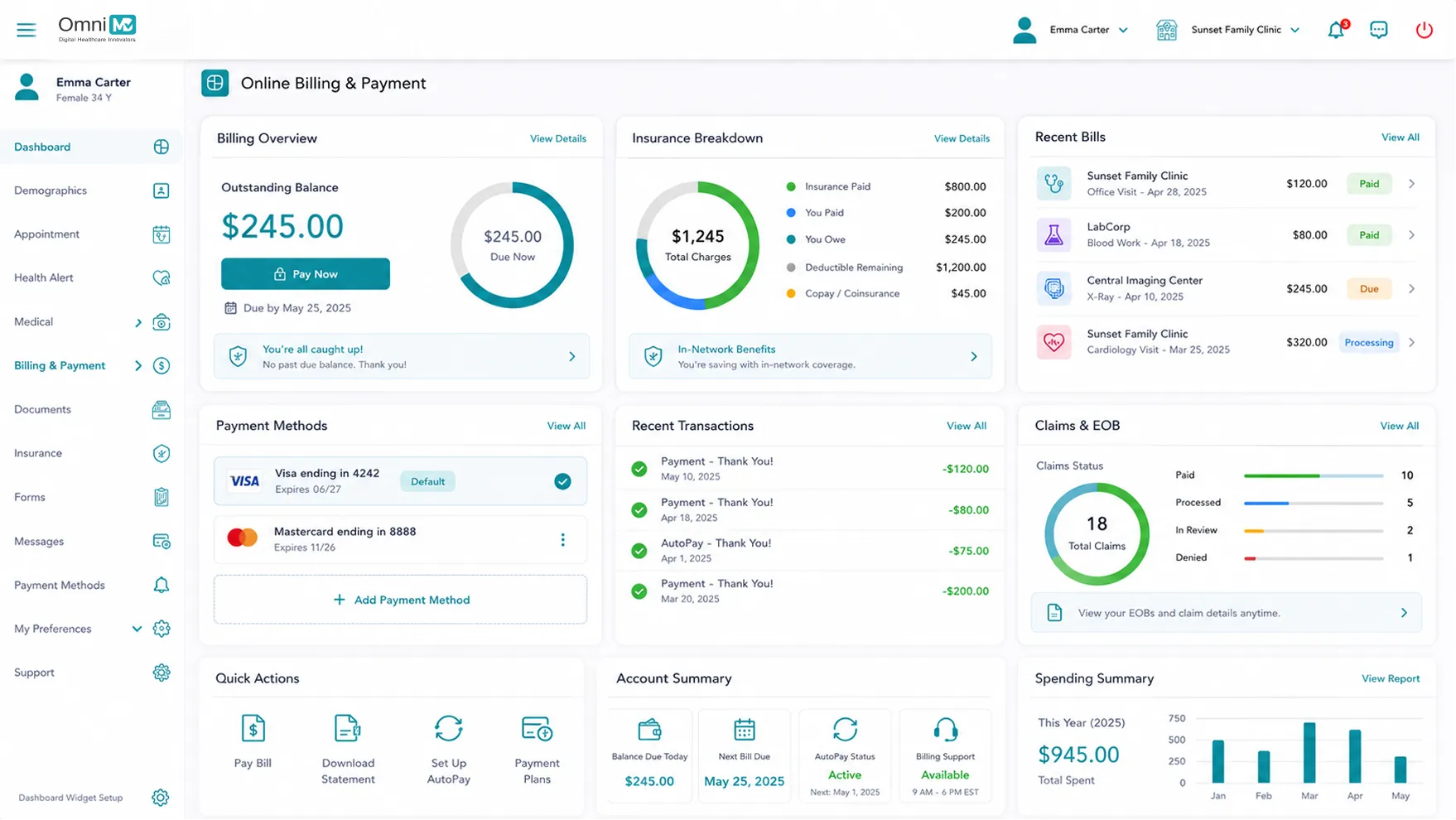

Online Billing and Payment
Patient Portal With Telehealth and EHR Integration

Patient Portal With Telehealth
and EHR Integration

OmniMD patient portal connects directly to your EHR, practice management system, and billing platform so data entered by patients flows into the clinical record automatically. Appointment requests populate your scheduler. Lab results posted by your EHR appear in the portal without staff re-entry. This unified data flow removes the manual handoffs that create errors and staff frustration in practices using disconnected portals.

7 Health Record Access

24/7 Health Record Access

HIPAA-Compliant Communication

HIPAA-Compliant Communication

Customized Care Instructions

Customized Care Instructions

Integrated EHR+RCM+PMS+RPM

Integrated EHR+RCM+PMS+RPM

Experience the Advantage

Real Stories From Medical Practices Thriving With OmniMD

Frequently Asked Questions

OmniMD patient portal software is a HIPAA-compliant online platform that gives patients 24/7 access to their health records, lab results, visit notes, appointment scheduling, secure provider messaging, prescription refill requests, and billing. Patients log in from any device without installing a separate app. Because the portal is built directly into the OmniMD EHR, patient-entered data updates the clinical record in real time without manual staff re-entry. Practices using OmniMD report 20 to 30 percent reductions in inbound front-desk calls within 90 days of go-live as patients complete transactions through the portal that previously required staff time.

Absolutely. The portal’s UI/UX is designed responsively, delivering a device-agnostic experience. Patients receive full access and identical functional richness across phones, tablets, and desktops, without compromise.

Solo or small practices (1 to 3 providers) go live in 2 to 4 weeks. Group practices (4 to 15 providers) complete implementation in 4 to 8 weeks, including role-based configuration and patient enrollment setup. Multi-location groups with 15 or more providers require 6 to 12 weeks for phased rollout. Every OmniMD implementation includes a dedicated specialist who manages technical setup, EHR connection, staff training, and go-live support. Existing patients receive automated activation invitations rather than requiring staff to manually contact each patient.

Yes. Patients see lab results in their portal as soon as the provider releases them in the OmniMD EHR. No batch export or manual upload is required. Prescription details, visit notes, and care instructions are available the same way. Because the portal is built directly into OmniMD’s EHR, there is no data lag from a third-party sync. The portal also displays active medications, immunization records, and historical visit summaries in a single view.

OmniMD patient portal is EHR-native, built into OmniMD’s EHR rather than added as a third-party layer. Data flows directly between the portal and the clinical record without HL7 or FHIR integration projects. Appointment requests from the portal appear in the OmniMD scheduler immediately. Lab results released by the provider appear in the patient portal view within minutes. For practices migrating from a different EHR, OmniMD handles the patient data migration as part of implementation.

No. When a practice migrates to OmniMD, existing patients receive an automated invitation to activate their portal account. OmniMD imports patient demographic and contact data during EHR migration, so patients verify their identity rather than re-entering their full information. Most practices complete patient enrollment within 30 to 60 days of go-live using OmniMD’s automated invitation workflow without staff manually contacting each patient.

Yes. OmniMD patient portal is a mobile-responsive web application. Patients access it from any smartphone, tablet, or desktop browser without downloading an app. Mobile-responsive web portals achieve higher registration and active usage rates than app-only solutions because requiring patients to install a native app creates a registration barrier, particularly for older patient populations. OmniMD patient portal achieves full feature parity across mobile browsers and desktop, so patients can schedule, message, pay, and view records from any device.

Yes. OmniMD holds ONC certification, which requires providing patients with electronic access to their health information through FHIR 4.0.1 APIs without information blocking. The 21st Century Cures Act final rule (April 2021) prohibits certified EHRs from restricting patient access to health data. OmniMD patients can access their records through the portal and can authorize third-party health applications to retrieve their data via FHIR API. Practices using OmniMD satisfy the Cures Act patient access provisions and the Promoting Interoperability performance category requirements for MIPS reporting.

Practices using portal-based automated reminder workflows typically see 20 to 30 percent reductions in no-show rates compared to manual phone reminders. The reduction comes from two factors: more reliable reminder delivery through SMS and email (channels that reach patients phone calls do not), and the self-reschedule capability built into reminder links, which converts would-be no-shows into rescheduled visits. For a practice with 500 visits per month and a 15 percent no-show rate, a 25 percent reduction recovers approximately 18 appointment slots monthly. At a $180 average appointment value, that is over $3,200 in recovered monthly revenue from the reminder workflow alone.

Yes. Patients enrolled in OmniMD remote patient monitoring see their device readings — blood pressure, glucose, weight, oxygen saturation — inside the OmniMD patient portal without installing a separate app. Device data appears in the patient portal view as readings are transmitted from the monitoring device. Providers see the same data in the clinical dashboard simultaneously. This eliminates the patient app fragmentation that reduces RPM adherence in practices using standalone RPM vendors who require patients to log into a separate platform to view their readings.

Yes. OmniMD executes a HIPAA Business Associate Agreement with every practice before patient portal access is activated. The BAA defines OmniMD’s security obligations, breach notification responsibilities, and data handling restrictions under HIPAA. Without a signed BAA, a vendor cannot legally handle Protected Health Information on a practice’s behalf. Practices should require a signed BAA from every patient-facing technology vendor they work with, including portal, telehealth, secure messaging, and AI documentation providers before granting system access.

A standalone patient portal is a separate product that connects to an EHR through an HL7 integration or scheduled data export. This creates data lag, reconciliation work, and an additional vendor contract to manage. An EHR-native portal — like OmniMD — is built into the EHR itself. Patient-entered data writes to the clinical record immediately. Lab results appear in the portal within minutes of provider sign-off. Appointment requests from the portal appear in the scheduler in real time. There is no integration layer to maintain and no data accuracy gap between the portal view and the clinical record. Practices running standalone portals typically spend 10 to 20 hours per month on data reconciliation that does not exist in an EHR-native environment.